Recording exclusion editor
Purpose
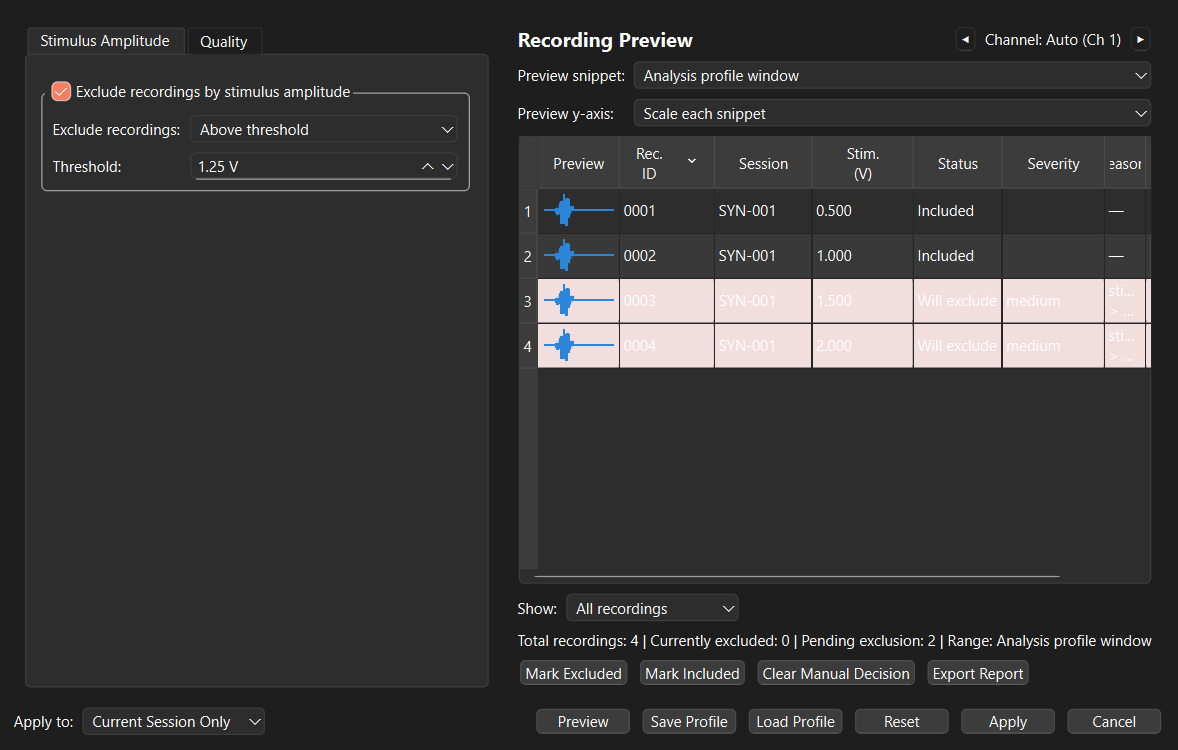
The Recording Exclusion Editor helps you review and stage recording exclusions before committing them. Open it from Edit > Data Curation > Recording Exclusion Editor after selecting a session.
Exclusion changes are applied as one undoable bulk action. Nothing changes in the data until you choose Apply.
Before you begin
Select a session and decide whether the intended review applies only there or to its dataset or experiment. Use the broadest scope only after checking a representative session.
Steps: review and apply
- Choose Apply to: current session, entire dataset, or entire experiment.
- Set the rule or quality thresholds.
- Choose Preview to calculate the proposed result. Changing a criterion makes the preview stale; preview again before applying.
- Review the table, waveform snippets, severity, reasons, and measurements.
- Select rows to stage Exclude or Include decisions when a rule needs correction.
- Choose Apply, then inspect the affected plot. Use Edit > Undo to reverse the complete bulk change.
Stimulus-amplitude rules
In the Stimulus Amplitude tab, enable the rule and choose whether to exclude recordings above, below, inside, or outside the supplied voltage limit(s). This is useful for protocol-defined stimulus ranges; it is not a signal-quality assessment.
Quality review
In the Quality tab, enable automatic checks as needed. The editor can assess low signal-to-noise ratio, baseline drift, flatline-like traces, line-noise energy, sustained bursts, and robust within-session outliers. Choose whether those measures use the analysis-profile window, the full recording, or a custom time range. The selected preview channel is used for the waveform snippets and quality calculations.
Automatic flags are proposals, not conclusions. Inspect the trace and reason column before excluding a recording. A manual Include decision overrides an automatic flag until you clear that staged decision. Existing exclusions are preserved unless you deliberately include the recording.
Save, report, or discard
Use Save Profile to reuse a set of exclusion criteria and Load Profile to bring one back. Loading a profile does not alter recordings; run Preview and review it first. Use Export Report to save the review state, criteria, measurements, reasons, and pending decisions for an audit trail.
Reset discards staged criteria, flags, and manual decisions in the dialog. Cancel closes without committing staged work.